User Manual
Dashboard
Navigation Menu
Main Panel
Admin Menu
Appointments List
Document Library
Client Record
Appointment Record
Templates
Settings
Data Exports
Account
Navigation Menu
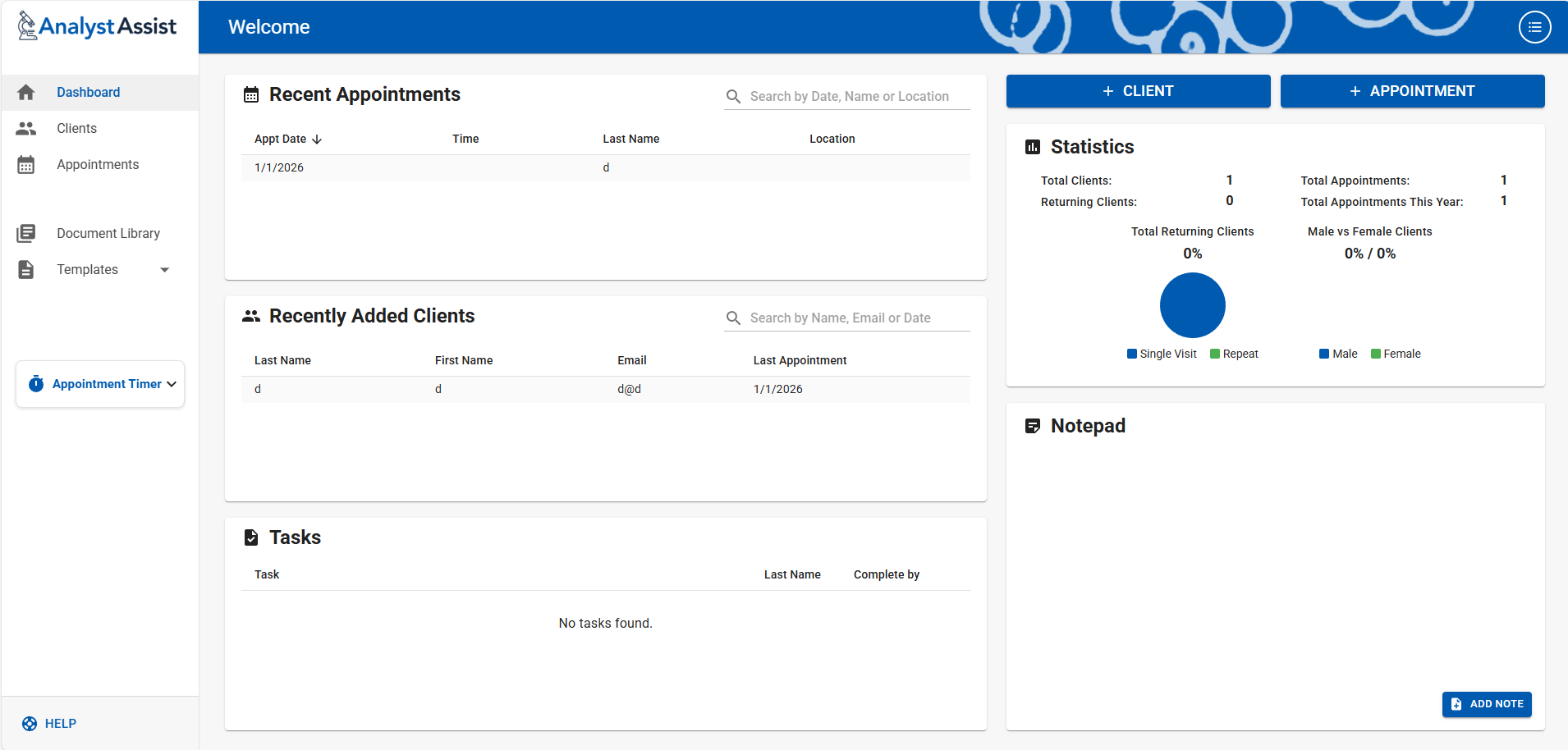
This sidebar menu contains all the main access points for navigating throughout AnalystAssist and can be used at any time
Dashboard - Returns user to the main Dashboard page at any time
Clients - Open the full Clients List page
Appointments - Open the full Appointments List page
Document Library - Open the file storage page for documents (e.g. pdf handouts, info sheets) that can be attached to emails being sent to Clients/Patients.
Templates - The pages for adding, editing and deleting the form, report and email templates used throughout AnalystAssist
Appointment Timer - A simple timer application for timing appointment duration.
User Manual/Help - Links to the documentation and support sections of the website
Main Panel
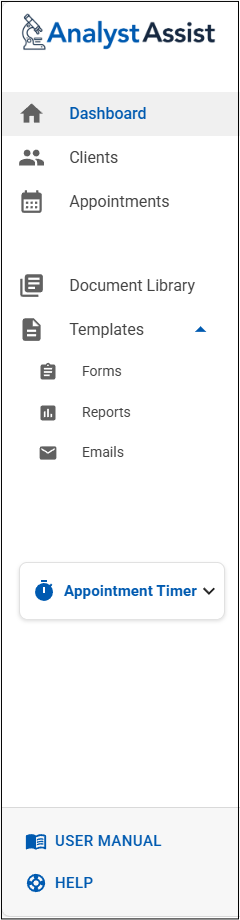
Recent Appointments - List of the most recent appointments up until today. Clicking an entry will open the relevant Appointment Record.
Recently Added Clients/Patients - List of new Clients/Patients. Clicking an entry will open the relevant Client/Patient Record.
Tasks - Summary of all Client/Patient tasks. Due or overdue Tasks appear red. Clicking an entry will open the relevant Client/Patients Record.
+ Client/Patient Button - Create a New Client/Patient Record
+ Appointment Button - Create a New Appointment Record. Initially, you will be asked to select the relevant Client/Patient for this new Appointment or to create a new one.
Statistics - A display of the most relevant statistics related to your Clients/Patients.
Total Clients/Patients - a count of the Client/Patient Records in your account.
Total Appointments - a count of the Appointment Records in your account.
Returning Clients/Patients - the number of Clients/Patients with more than one Appointment Record.
Total Appts Prev 12 Months - a count of the Appointment Records in your account in the previous 12 months.
Total Returning Clients - a pie chart indicating the percentage of Clients/Patients that have more than one Appointment Record in your account.
Male vs Female Clients/Patients - a pie chart indicating the split of Client/Patient Records that have a gender marked as ‘Male’ or ‘Female’.
Notepad - An editable list of Notes items. Click ‘Add Note’ to add a new Note, then overwrite ‘New Note’ and click ‘Save’ to store. Click the ‘trashcan’ icon to delete a Note.
Admin Menu
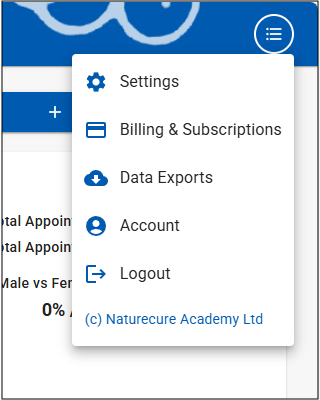
Click the List icon (3 lines with circle around it) in the top App Bar to open the Admin Menu
Settings - Navigate to the Settings page to customise the various Settings for how AnalystAssist functions and looks
Billing & Subscriptions - Manage your subscription to AnalystAssist
Data Exports - Export all your Client/Patient and Appointment data
Account - Manage your User Account: Change your email address or password, enable or manage Two-Factor Authentication, download your personal User data, and delete your account completely.
Logout - Logout of the AnalystAssist platform. This will periodically happen automatically.